

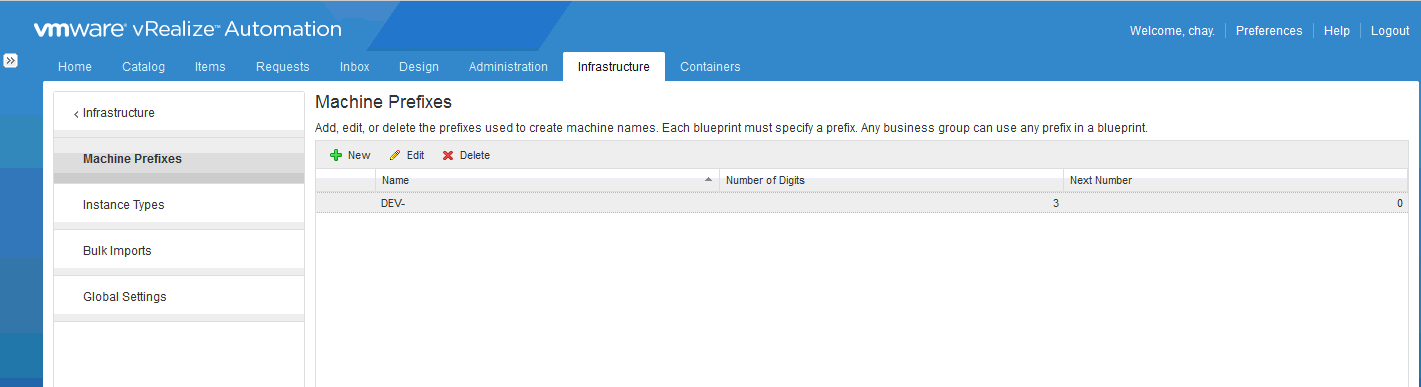
Our next step in the initial setup of vRA 7 after creating our fabric group, is to create a business group. A business group associates a set of services and resources to a set of users, often corresponding to a line of business, department, or other organizational unit. Business groups are used when creating reservations and entitling users to items in the service catalog. Before a user can even begin to request catalog items, they must belong to a business group. But before we get into creating the business group, we might want to go ahead and create a machine prefix as this will be one of the options that we set when we create the business group. You use machine prefixes to generate the names of provisioned machines. To create a machine prefix navigate to Infrastructure > Administration >Machine Prefixes. Click New and enter in the the prefix name, number of digits and next number. In this case, the first computer name will be DEV-000 since the number of digits is set to 3 and the next number is 0. The next machine would be DEV-001 and so on and so forth.

 Let's v4Real